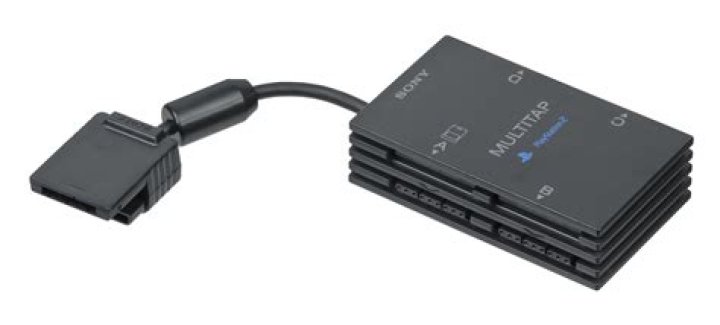

I recently bought a new Playstation 2 slim and a new multitap to allow me to play with more than two players at once, but am unsure how to get it to work as it did not come with instructions or box or anything.
I want to get it to work so that I can play Star Wars Battlefront with my friends, however when I plug in a controller, it does not even register or anything.
4 Answers
I had some trouble with my multitap at first, but I've had it working for some time now.
If you have already verified that your model multitap and your model PlayStation will talk to each other then you're ready to follow the steps below (modified from an eHow article). If you haven't verified this, or aren't sure how, open a new question with the model number of your Playstation and information about the multitap you have, preferably with picture.
1 Find a game that will support three or more players.
2 Turn off your PlayStation.
3 Place the game in the CD tray.
4 Plug the multitap into the first player slot of your PlayStation.
5 If needed, plug the controller or a 2nd multitap into the second player slot of the PlayStation.
6 Plug up to four controllers into the multitap.
7 Turn on your PlayStation.
8 Set up the game with the controller in the first player slot.
9 Play on.
Also, not sure if this helps, but I've been told that the multitap flat out doesnt work with playstation slim. This is unconfirmed, but again, its what I've been told.
1Which port the multitap goes into varies somewhat from game to game. Normally, (unless the game supports more than 4 players) it goes in slot 1, with all controllers plugged into it.
Edit: Make sure you game supports more than 2 players.
3You have to blow in the end of the multitap and player slot you insert it into, I also had the same problem with my ps2 slim, bu also Star wars battlefront 1 & 2 are both only 2 player games.