
I'm trying to improve my Skyrim performance and balance it with graphical quality but I don't know the difference between skyrim.ini and skyrimprefs.ini. When I modify some value in skryimprefs.ini, start, and quit the game I notice slight changes in the file. What is the difference between skryim.ini and skyrimprefs.ini? I get about 20-25 FPS in my game with medium quality settings. I've the ATI 12.1 preview driver installed with ATI Tray Tools and I have about 2 GB VRAM. I believe it's 512 MB physical vram and 1.5 GB shared vram. Overclocking and Overdrive(Powerplay) isn't working on my box because it's a laptop. Here is my Systeminformation with ATT:
ATT Version 1.7.9.1573 Display adapter ATI display adapter (0x9591) Core Name M86 SubVendor Unknown 1734 SubDevice C09D BUS 2 Device 0 Function 0 Base Address 0 C0000008 Base Address 1 0000AF01 Base Address 2 9FBF0000 Base Address 3 00000000 Bus Type Supported PCI Express 1.x PCI-E Link Width 16 Max PCI-E Link Width 16 SMARTGART Installed No Driver Version Unknow Release Version 8.911.1-111125a-129213E-ATI QuadBuffer Stereo Support No Catalyst Registry Path System\CurrentControlSet\Control\Video\{F4527CAB-AC6C-4FAB-AA49-2969AF786E17}\0000 ______________________________ Clock Information BIOS VPU 500,00 Current VPU 54,84 BIOS MEM 400,00 Current MEM 198,00 ______________________________ Overdrive Adapter 0 Supported Yes Type PowerPlay Level 0 : GPU/MEM/VDDC 110,00/400,00/1,100 Level 1 : GPU/MEM/VDDC 300,00/400,00/1,100 Level 2 : GPU/MEM/VDDC 600,00/700,00/1,100 ______________________________ Radeon PCI configuration space 00 01 02 03 04 05 06 07 08 09 0A 0B 0C 0D 0E 0F 00 02 10 91 95 06 04 10 00 00 00 00 03 08 00 80 00 10 08 00 00 C0 01 AF 00 00 00 00 BF 9F 00 00 00 00 20 00 00 00 00 00 00 00 00 00 00 00 00 34 17 9D C0 30 00 00 00 00 50 00 00 00 00 00 00 00 00 01 00 00 40 00 00 00 00 00 00 00 00 00 00 00 00 34 17 9D C0 50 01 58 03 06 00 00 00 00 10 A0 12 00 A0 8F 2C 01 60 10 08 00 00 01 0D 00 00 40 00 01 11 00 00 00 00 70 00 00 00 00 00 00 00 00 00 00 00 00 00 00 00 00 80 00 00 00 00 00 00 00 00 01 00 01 00 00 00 00 00 90 00 00 00 00 00 00 00 00 00 00 00 00 00 00 00 00 A0 05 00 81 00 0C 30 E0 FE 00 00 00 00 A0 49 00 00 B0 00 00 00 00 00 00 00 00 00 00 00 00 00 00 00 00 C0 00 00 00 00 00 00 00 00 00 00 00 00 00 00 00 00 D0 00 00 00 00 00 00 00 00 00 00 00 00 00 00 00 00 E0 00 00 00 00 00 00 00 00 00 00 00 00 00 00 00 00 F0 00 00 00 00 00 00 00 00 00 00 00 00 00 00 00 00 Hardware Information ASIC (Software) Method Family 72 Emulated Revision 81 Gfx Engine ID 6 VRam Bit Width 128 Installed memory 2171 OverDrive 5 Limits Adapter 0 Core clocks Min 55,00 - Max 600,00 Memory clocks Min 200,00 - Max 700,00 VDDC Min 1,100v - Max 1,100v ______________________________ FAN 1 0000000C 2 00006C2F 3 001E2187 4 00BF0228 5 5A50463C 6 64615F5D 7 51433628 8 87796C5E Video BIOS Information Adapter0 Version 010.088.000.023 Part Number BK-ATI XXXXXXXXXXXXXXXXXXXXXXXXX Date 2008/07/03 23:46 Vram Type HyperMemory ______________________________ Multi VPU Caps ______________________________ No additional information ______________________________ Multi VPU State Supported No 1 Answer
The two files simply store different things. The Skyrim.ini tends to be a little bit more core to the game - memory tweaks, the uGrids setting, etc - while the SkyrimPrefs.ini is more for things that are actually likely to changed by most users (not directly, but the launcher/in-game settings edit this file so this is basically the preferences store).
In practice, if you have a specific tweak you're trying to implement it will belong in one of the two files, put in the other file it will likely have no or an unexpected effect. Most of the tweaks that are safe and easy belong to SkyrimPrefs.ini.
Also, do note that there are plenty of new items you can add to the two files, so if you're trying to improve performance make sure that you go and look up some tweak guides that will give you these extra items to add. Tweaking what is already in the files won't cover everything.
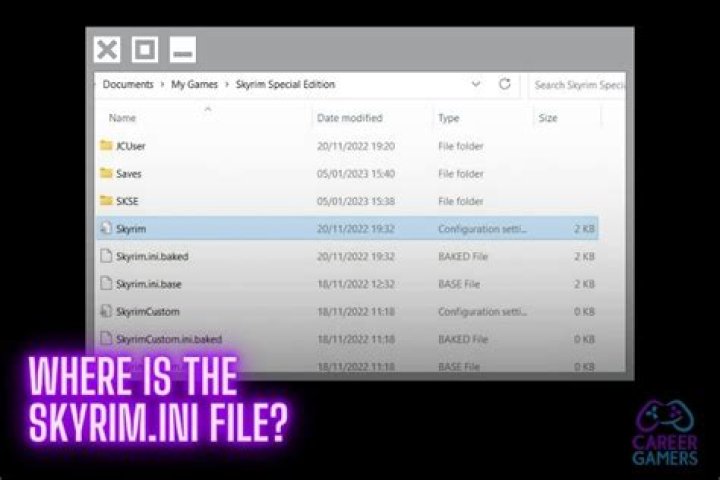
Oh, and make sure you edit the ones in My Documents\My Games\Skyrim and not those in the game's install directories.