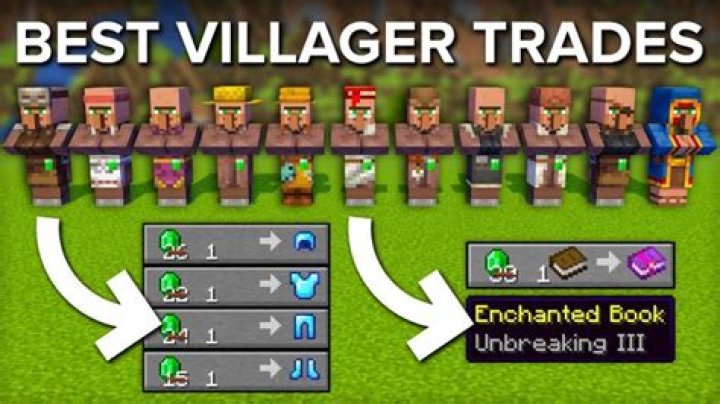
I'm creating a custom villager Trading with Custom Items. It is way more complicated, but this is the essence of my question. Thing is, when I use the code I made below my Villager trades look like this:  When the paper should look like this:
  aka. enchanted and Named, and the Chicken should have a custom Name as well as a Lore. The second Trade is completely messed up, as nothing is showing at all, when there should be a trade "4 Drachma" for "1 Miles' Delicious Rabbit Stew".
VillagerData: { profession: butcher, level: 99, type: plains }, CustomName: "\"Butcher Miles\"", NoAI: 1, Invulnerable: 1, Offers: { Recipes: [ { buy: { id: "paper", tag: { display: { Name: [ { "text": "Drachma", "color": "#ffff66" } ], Enchantments: [ { id: fortune, lvl: 1 } ], Lore: [ { "text": "Money, you use it to buy things.", "italic": true, "color": "white" } ] } }, Count: 3 }, maxUses: 5, sell: { id: "cooked_chicken", tag: { display: { Name: "Miles' Tasty Chicken Wings", Lore: [ "Yummy!" ] } }, Count: 1 }, rewardExp: 0b }, { buy: { id: "paper", tag: { display: { Name: [ { "text": "Drachma", "color": "#ffff66" } ], Lore: [ { "text": "Money, you use it to buy things.", "italic": true, "color": "white" } ], Enchantments: [ { id: fortune, lvl: 1 } ] }, Count: 4 }, maxUses: 3, sell: { id: "rabbit_stew", tag: { display: { Name: "Miles' Delicious Rabbit Stew", Lore: [ "Works wonders!" ] } }, Count: 1 }, rewardExp: 0b } } ] } } 1 Answer
There are many inconsistencies that are causing your command to fail. Here was your old data.
1 VillagerData: { 2 profession: butcher, 3 level: 99, 4 type: plains 5 }, 6 CustomName: "\"Butcher Miles\"", 7 NoAI: 1, 8 Invulnerable: 1, 9 Offers: { 10 Recipes: [ 11 { 12 buy: { 13 id: "paper", 14 tag: { 15 display: { 16 Name: [ 17 { 18 "text": "Drachma", 19 "color": "#ffff66" 20 } 21 ], 22 Enchantments: [ 23 { 24 id: fortune, 25 lvl: 1 26 } 27 ], 28 Lore: [ 29 { 30 "text": "Money, you use it to buy things.", 31 "italic": true, 32 "color": "white" 33 } 34 ] 35 } 36 }, 37 Count: 3 38 }, 39 maxUses: 5, 40 sell: { 41 id: "cooked_chicken", 42 tag: { 43 display: { 44 Name: "Miles' Tasty Chicken Wings", 45 Lore: [ 46 "Yummy!" 47 ] 48 } 49 }, 50 Count: 1 51 }, 52 rewardExp: 0b 53 }, 54 { 55 buy: { 56 id: "paper", 57 tag: { 58 display: { 59 Name: [ 60 { 61 "text": "Drachma", 62 "color": "#ffff66" 63 } 64 ], 65 Lore: [ 66 { 67 "text": "Money, you use it to buy things.", 68 "italic": true, 69 "color": "white" 70 } 71 ], 72 Enchantments: [ 73 { 74 id: fortune, 75 lvl: 1 76 } 77 ] 78 }, 79 Count: 4 80 }, 81 maxUses: 3, 82 sell: { 83 id: "rabbit_stew", 84 tag: { 85 display: { 86 Name: "Miles' Delicious Rabbit Stew", 87 Lore: [ 88 "Works wonders!" 89 ] 90 } 91 }, 92 Count: 1 93 }, 94 rewardExp: 0b 95 } 96 } 97 ] 98 } 99 Problems
- Lines 17–20: When you enter JSON, the entire raw JSON text is a string tag, not NBT formatted like JSON. For example, the following is incorrect:

and the following is correct:
- Lines 22–27:
Enchantmentsis in the wrong place. It should be outsidedisplaybut still insidetag. - Lines 28–31: Same problem as #1. Each item within the
Loretag should be a string tag containing raw JSON text, not compounds simulating JSON. - Lines 44–47: Here, you forgot that names have become JSON text components. Just like line 6, you can use
\"or you can use a full JSON component like in the images above. - Lines 59–64: Same problem as #1.
- Lines 65–71: Same problem as #3.
- Lines 72–77: Same problem as #2.
- Lines 85–90: Same problem as #4.
Just fix those 8 and you'll be good to go!