I've been itching to play some flight simulator X recently, so I pulled out my DVD copy and threw that sucker in. However, I purchased that game back in the XP/Vista days, now I'm on Windows 8.1 and I cannot install the game.
When I try to install the game by launching DVDCheck.exe, the InstallShield wizard starts up, hangs on "preparing installation" then crashes. After two windows error reporting dialogs, the wizard shows this error message:
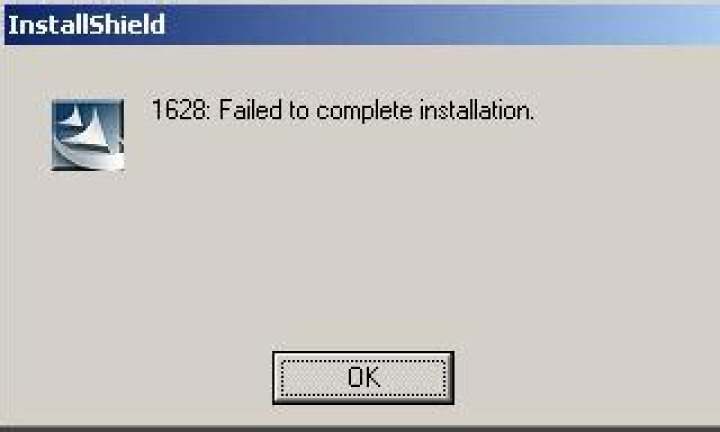
I've read a bunch of similar questions online for the same error code I get when I install, and all of the solutions don't seem to have an effect. These are the troubleshooting steps I've tried:
- Running installer as Administrator
- Logging in as the local Administrator account and installing
- Attempted to install in Safe-Mode (Windows Installer Service doesn't run in safemode)
- Renamed the Installshield folder in
C:\Program Files\Common Files\ - Verified that I'm using the latest version of Windows Installer (V 5.0.9600.16384) and .NET (4.5.1)
But still no luck. Microsoft reports that FSX is compatible with Windows 8.1 on their compatibility website, but I can't seem to get it to install.
Further investigation showed this in event viewer:
Faulting application name: IDriver.exe, version: 11.0.0.28844, time stamp: 0x4250d396 Faulting module name: unknown, version: 0.0.0.0, time stamp: 0x00000000 Exception code: 0xc0000005 Fault offset: 0x03f45cc0 Faulting process id: 0x1798 Faulting application start time: 0x01cf3b1d160f935c Faulting application path: C:\PROGRA~2\COMMON~1\INSTAL~1\Driver\11\INTEL3~1\IDriver.exe Faulting module path: unknown Report Id: 5a149145-a710-11e3-832f-50e549c2d54b Faulting package full name: Faulting package-relative application ID: System Specifications are:
- AMD FX-8350 @ 4.20GHz
- 16GB of RAM
- 2x Nvidia GTX 660 though SLI with latest Drivers
- 1TB HDD
- Windows 8.1 Pro 64bit.
3 Answers
I decided to just bite the bullet and bought a new copy.
It worked. If you're having the same issue I am having, I apologize but there really wasn't a solution to my problem other than my installation media was faulty.
I know a lot of people will have found this page looking for a solution to the notorious 1628 error that can occur when installing FSX. I am going to give a solution even though the asker's problem has been solved, because it might help people who find this page and need a solution to the problem. A solution that worked for me was:
Step 1: Got to the settings app in windows 8.1 and create a new account
Step 2: Log onto the new account and insert the first disk for FSX open the disk in the windows file manager and find the installer application
Step 3: right click on the application and run as an administrator
Step 4: FSX should now start to install, follow the on-screen instructions , it took around an hour for my install to complete but it may take longer on other computers
I hope this helps those having similar problems
if it still does not install make sure any installwizard folders are deleted from the common files folder in program files and that no installwizard processes are running. Once you have done this try the installation again.
If you need further information please leave a comment
If "compatibility" means "does FSX work in Windows," I can say that yes, it is compatible.
However, according to my tests on more than 35 different PCs, all of them have experienced a reduction in frame rate. The amount of reduction was almost 9 to 12 frames per second!